Hobbyists, businesses, and potential clients… this post is for you!
This post covers 3 simple ways for you to build a website for free… or almost free. This article is ideal for start-ups, hobbyists, and individuals looking to gradually build their online presence. All you need is a computer and internet access.
This post will cover the pros and cons of each system based on real-life experience.
It should be noted that I am not affiliated with these companies
How to build a website for FREE – Summary Overview
To build a website for free, you can use a selection of tools, software, and hosting options to start creating your website with next to no upfront cost. Many DIY developers use platforms such as WIX and WordPress to build websites and blogs for free by learning the tools themselves. However, it should be noted that ‘Free’ is not always strictly free in the truest sense.
You can use WordPress’s free domain and hosting to save money. But the hidden cost comes at the expense of handing over proprietorship and backend administration of your website. Although it can be easier to transfer away to another hosting platform if they support a website built in WordPress.
Instead of opting for a full website, website owners and small businesses can also opt for an easy-to-maintain solution, such as having a ‘Facebook Business Page Only’ or a Blogger in the early stages of their website journey.
Feel free to read on with learning the general idea of how to build a website for free… or just hire a design guy for the job!
Here is a list of solutions to create a website for free.

How to build a website for FREE | Start building Something
1 ) You Can Use Blogger To Create a Website For Free
Not heard of Blogger? Blogger (blogspot) has been around for years and is part of Google. With Blogger, you can create your website or blog completely free!
Blogger is fine if you are looking to create a simple blog as a hobbyist or put something together quickly for a friend or relative. I have used Blogger as part of my ‘hobby and general stuff’ website, which I treated as a creative/personal dumping ground. You can see my personal blog here.
Blogger isn’t solely for amateurs. I have seen great examples of Blogger being used by professionals and semi-professionals, despite the fact that it is a free platform.
Generally speaking, Blogger is used more by hobbyists than professionals, but this doesn’t render the software totally unworthy and crap! Some blogs are great when made on this platform. Especially by hobbists.
Due to Blogger’s low point of entry, it is a magnet for homemade, freebie, and hobbyist blog creators. A great starting point for those learning the baby blocks.
Print & Pattern – is an exceptional use of Blogger. It comes with a jobs board, products, and other key information centred around graphic and surface pattern design.
Blogger Hero Perks – Blogger Review
It might also be worth mentioning that you can also monetise your ‘Blogger’ blog very easily using Adsense, should you choose to do so. But to make it worthwhile you need a hgh volume of traffic to your blog to make this worthwhile. a much more challenging method of monetisation these days.
Blogger Pros :
- FREE – Blogger is free. You can set up an account today and start writing about your hobby or business pretty much right away.
- Reasonably easy to use – Blogger is relatively straightforward to use. Buttons in the left-hand navigation show what is what. All you need to do is create a “new post” and type away – as easy as that, although it is not without its quirks.
- Can be polished – with a bit of thought, a lot of application, and headache tablets, you can make your Blogger look professional. But in my personal experience, it is an uphill struggle.
- No fuss – You can set up a Blogger website quickly; you don’t need a web guru to help.
Blogger Cons :
- Typically regarded as unprofessional – if you are using a Blogger for a business website, it can frame you as an amateur. Blogger websites tend to have a dated essence to them in terms of appearance and format. Web users can more often than not tell something looks a bit ‘Home-made’. In business, making a good impression is important, and you want to avoid being… ‘Homemade’ if you want to be taken seriously. Not all Bloggers are created by amateurs, but many do use this platform as it is free.
If you must use Blogger, dress it well. - Awkward code – know how I said to try and ‘dress it’? Now imagine trying to dress an excited squirrel! Well, it certainly won’t put its arms into the sleeves. This is Blogger, an unwilling and uncooperative squirrel. The code and interface can be very awkward to use if you are trying to tweak alignment, adjust paragraphs, or bold text. It also adds a lot of junk HTML to your article, making it needlessly difficult to tailor in code view.
- You don’t really own it – Although it is free to use and, as a free tool, it is pretty good, it’s not all your intellectual property. Should your Blogger be closed for some reason, you will lose all of your content with it. For ‘free’, you will relinquish control and imagine losing 5 years’ worth of posts? Back up your content if you decide to use Blogger.
- Blogger and SEO – although it’s not bad, I’m not convinced about its friendliness towards being seen by the search engines, either. Put it this way… There are many better!
How to build a website for FREE | Blogger Verdict :
It’s good for hobbyists, it’s free, but there are other options that I would consider over Blogger. Generally, if you want a professional presence, I would use a better platform, such as WordPress.
Creating Your Website For Free Verdict
Rating out of 5 :
1 = Poor | 5 = Excellent
- Cost = 5
- Ease of use = 2
- Creation Efficiency = 1
- Set Up = 4
- Quality Of Websites ( On average ) = 2
- Value = 2
- Total = 16
Got more questions?
Create a website for free using WIX ( 2026 )
Although I am less familiar with the pricing structure of WIX, WIX still claims you can build a website for free.
A viable option if you are considering free options to create a website!
Wix gets some unjust stick. Developers ( hardcore coders ) scoff at it because it is a ‘website builder’; the only real reason for this ‘anti’ is due to a combination of accessibility and snobbery. Wix, which can be used by non-coders, opens up the market and enables DIYers to attempt to make a website.
My Opinion on WIX: When building a website for free
Although time has long since passed when using WIX, WIX isn’t too bad! And if you are strapped for money and just starting out, maybe consider this as a possible option in the beginning. WIX allows you to visually drag and drop your website together to create a design that you may not vomit over! You can even add snippets of code as and when required.
Not all bad, not all great in my opinion either.
Here is an example page & website I was part of when building a new website. I created both the UI and content for the page.

What is WIX like for building a website?
It’s pretty good in short… but there’s more to that story. I have used WIX in a past role to create an easy-to-maintain website without the need for code.
That’s well and good, but why use it?
It’s accessible, free / cheaper, great for restricted budgets, and does the job. You don’t have to be a coder either.
WIX enables users to position page elements without having to hard-code everything. You can build your website or web page visually.
Imagine using a program like Microsoft Publisher, Photoshop, or Canva to create a website from start to finish? No need to code, no headaches, no bar to entry!
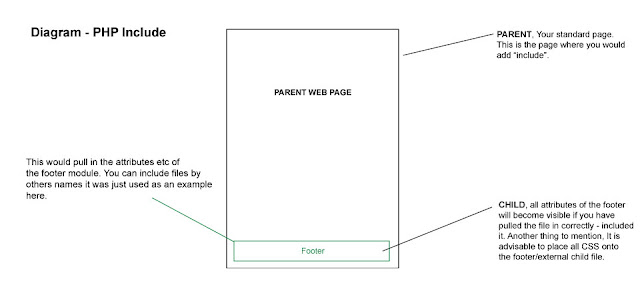
There is more to website design than graphics, but for the sake of argument, I want to keep this post lean. You can make a website as a business owner or as a designer. For those who like a bit of code, you may be interested in reading a bit of theory and practice on PHP include.
WIX – you don’t need to be a Developer to make it work! The mess can be left down to the casual website developer instead. (Whoops, did I say that out loud? )
Here are my shared experiences with the WIX website builder.
Creating a Website With Wix – Pros :
- Neat & Tidy –An all-in-one neat little packaging with a relatively straightforward drag and drop interface to assemble your website.
- Cheap – WIX comes with a range of pricing plans to suit a variety of budgets. It also comes with its own hosting packages.
- Cool features – It comes with some nice little integrated features, such as a mail-list manager and an easy-to-use image library; you can also create a basic shop with it, too.
- Visual Designer – It’s great if you like to create websites visually, but please note that it’s not to be used for creating graphic design and banners!
Wix Cons :
- The responsive design was/is sub-par – arguably worse than Blogger. As a non-developer, you may be wowed initially by how easy it is to use, but what you see isn’t what you get. They call these WYSIWYG’s. ( What you see is what you get ). Ironically, with website builders, be it Dreamweaver , Wix, or others, this is not always the case. ( based on when I last used it to make a website )
- Build twice, takes twice as long – Further to the point, you ( used to) have to build twice or suffer a website that will not work properly on a smartphone. Eg can’t read text without zooming with fingers etc. This bad user experience will be passed on to your customers.
- Clumsy fluid layout – As a designer, this would be something I would pick up on. The default desktop website can have some somewhat awkward behaviour when it comes to viewing the website in different browsers. Fluid and responsive websites are not easy to build, and WIX certainly hasn’t mastered this yet.
- Slow Down – If you have a large webpage with lots of elements and content, this can overwhelm the WIX builder. You will find that as you are dragging (pushing) elements around, they start to lag and stick. This can become very frustrating if you are trying to work toward a tight deadline in a busy or demanding environment.
- limited control with deeper development issues – By using a website builder such as WIX you surrender building a more accessible and technically proficient website. It’s also trickier to get into the real nuts and bolts to solve somewhat basic issues.
Wix Verdict – Jack of all
Cheap and cheerful and great for non-techies. This user-friendly website builder is good if you’re starting out. I have seen WIX used for straight up brochure and small-scale websites with great results and if you are on shoe string, it could be something to consider. WIX is nice to use, quite slick and an intuitive piece of online software! Not the cheapest, but ok.
Rating
out of 5 : : 1 = Poor 5 = Excellent
Cost
= 3
Ease of use = 5
Creation Efficiency = 3
Set Up =
4
Quality Of Websites = 2
Value = 3
Total
= 20
———————————————
Best Price – WordPress is Free
WordPress has been available for years! It has grown a very large and loyal following that is building better product everyday. WordPress is completely free to use, it’s open source and has a large community of developers and agencies available to help. If you have your own domain and hosting, using WP is as simple as downloading and implementing it yourself. Certain hosting companies come with One-Click installer, which can make installing very straightforward, but this isn’t the case for all hosting companies.

If you don’t have hosting or a domain, you can also set up your WP hosting completely free – WordPress > don’t panic!
You can create very powerful website using WP and comes with a very large library of resources to build different types of websites: stores, blogs, brochure sites, downloads sites, ticket software, etc., etc. – it’s vast and WordPress has gone way beyond being just a blogging tool!
WordPress is integrated with many 3rd party companies, which range from over-automated email systems to analytics. There is also themes which turn WP into a visual website builder. All this plus the features mentioned before.
WordPress Cons
Hackers like it – being a victim of its own success and a large proportion of websites being made using WordPress, it’s a hackers paradise. If you have a very large-scale website, perhaps other options are better to consider.
Plugins can break – Although there are 1000’s of plugins on the WP marketplace, some of them can fail over time if they are not maintained.
Needs to be maintained – WordPress needs TLC occasionally. Pay attention to your dashboard or email notifications if you need to update your current version of WP or its plugins.
Set up – WordPress can be a challenge from time to time when trying to install it on your own host. This can range from obscure incompatibilities or ‘access’ not being configured properly
Tricky to change – The default version of WP can be tricky to tailor without knowing your way around CSS or downloading a plugin. This is where using a developer could come in use if you decide to use WordPress.
Used a lot – due to a lot of websites using WordPress website can start to feel the same.
WordPress Pros
Progressive & Powerful – WordPress is always pushing forward with its technology and its developer community are always improving the platform.
Community – WordPress comes with a large pool of knowledgeable developers creating new functions and extending the functionality of the default software through plugins and themes, which can either be purchased or downloaded for free.
Powerful for no or low budget (FREE) – you can create a professional and functional website with default WordPress software.
Do what you like with it, more or less – create your website today on your own domain and hosting, and you and can do what you choose with it – isn’t that great!
Simple to use – It comes with a reasonably easy-to-use ‘dashboard’ – not too dissimilar to Blogger.
– Plugins and Themes – Just too much awesome to list. Also, a lot of dross, but there is essentially a candy store of added functions to select from.
Rating out of 5 : : 1 = Poor 5 = Excellent
Cost = 5 / (*1 )
Ease of use = 4
Creation Efficiency = 4
Set Up = 3
Quality Of Websites = 5
Value = 5
Total = 26 / (*22)
*Cost variable due to free VS paid. As this article is about free and low-budget website solutions, the score jumps from free to expensive depending on whether you need a dev to help you.
WordPress Verdict : Great Value, Great quality
WordPress is a good platform and is worth considering if you want flexibility in what functions come with your website and whether you want to change it at a later date. You may require a developer to help you in the beginning but after that, your WP site is yours to do with as you choose.
That’s all! 3 Simple ways for getting a website online – in detail.
I hope this will offer some insight! If you need a Graphic Website Designer to help out with creating your business send me a message or if you have any queries about the listing above – also get in touch and will try my best to answer!
This article was written to give some guidance as how to go about creating a free website. This is based on my skills and experience. The opinions, based on my experience, are ‘my opinions’ and not that of others. Please bare in mind when making your business decisions on you website that you have considered what has been written and do your research thoroughly.
The scores were created for a bit of fun.
The platforms listed are tools. It’s down to you to offer great experience and value to the person reading it.
Why note read :
Why use Unity for your gaming project –
32 Tips for email marketing
Website UI Design
How to Design a Kickstarter Page