How to Back Up Design Files After ‘Handover’ | A DESIGNER’S ‘How-To’ GUIDE

How to back up design files after ‘handover’ or ‘sign-off’ is similar in definition and purpose. The design project has been completed. The files have been transferred from the designer to the client, and now the project and all of its data needs to be stored.

Much of the information written in this post is specific to my design clients, both past and recent, but that does not make the information irrelevant to the general reader looking for data storage tips. File storage and retention are important to anyone who cares about their time and money. No one wants the feeling of…


“I know, I will use the spare project I made! I accidentally deleted this one and…oh”

Yes, that feeling.

This post has been written to be low in design jargon and easy to follow for those who are non-technical. Ideal if you’re less familiar with design processes. There are also more direct tips and tricks in data storage towards the latter end of this article.

In terms of how to back up design files after handover and sign-off, the mantra is based on practices and information shared by other experts. This is also a school of thought I try to adhere to when possible.

That mantra is the ‘3-2-1 rule’ for file storage. And this means:

*3 – 2 – 1 : Keep three copies of your data, using two different types of storage media, and storing one copy off-site. ( if you can ).

How to Back Up Design Files After  'Hand Over'

Also, please read the disclaimer for more details and check what information is most applicable. This website or other affiliated websites do not take responsibility for any loss or damage when attempting to store your data! Check and think before you act!

How to Back Up Design Files After ‘ Handover ‘ | Quick Answer

To protect your design files after handover or completion, store your data on high-quality external devices and consider using cloud storage. It is also recommended to store your precious files in more than 1 location to protect against loss or damage.

In the later stages of a design process, a designer often transfers files and content to a client. This can include print-only files or the entire project, as well as ideation and development. The action of transferring files is either included in the cost or requires an extra fee. These details should be outlined in a design brief at the start of a project.

The specifics and details of how files are supplied and transferred are handled on a case-by-case basis, as there is not a one-size-fits-all solution. Many designers will opt for the most direct solutions and transfer files over the Internet. This is the most cost-effective method for data transfer in the majority of situations.

In terms of how to back up design files, I would encourage a client to use hardware and equipment from a reputable brand and avoid budget ‘knock-off’ models imitating higher-end makes.

Here are 2 different storage methods to consider when understanding how to store your design files:

External Storage Devices: You can use pen drives, external hard disks, and standard DVD’s and CDs to create copies and backups of your own files for safekeeping.

Cloud Storage: There are various types of cloud storage available on the market. Some of these are free, and others charge a fee for larger volumes of space to store your data.

Transfering design files


Storing Data Onsite-Offsite


Adhering to the 3-2-1 rule, it is recommended to store your files both on-site and off-site. Spreading your storage like this can better ensure resilience against loss or damage to your precious design files.

How to Back Up Design Files | In a Nutshell

In a nutshell, the idea of storing your design projects upon completion shouldn’t be complicated. Don’t put all your eggs in one basket!

Store your data on multiple secure devices and/or media. Don’t buy crumby storage solutions! Do your homework, and research the solutions that suit your needs and budget.

Last but not least… make sure to take your data into your own hands! Look after your stuff.

If this all sounds too scary and you want to take your data storage further, consider working with a specialist IT consultant in this area.

chip running


Important Disclaimer | Taking Responsibility for Your Project Files

Please remember: your files are your responsibility. Once your project files have been supplied to you or ‘handed over ‘, it’s a good idea to make sure you have your own secure copies and a simple backup system in place. This means you’ll always have access to your important files if something happens to your computer or storage.

Disclaimer Details: I do not store projects. I can’t take responsibility for the long-term storage, loss, corruption, or accessibility of files once they have been supplied to you.

Please make sure you keep your own backups and look after your files — just as you would with any other important business document.

It’s also worth remembering that design files can’t be guaranteed to be “future-proof.” Technology, software, operating systems, and file formats change over time. A file that opens perfectly today may require different software, an update, or even some conversion work in the future.

This is why keeping your original files, along with a couple of good backups, is one of the best things you can do to protect your investment in your design work. But that said, it still cannot guarantee usability or access to these files in the future.

How to Back Up Design Files After Completion | IMPORTANT – You Should Know!

As a client, DIY designer, or somebody who wants to take responsibility for their own design project. Before reading the how-to tips on backing up your design data, knowledge and preparation are key to making informed decisions about where and how to store your design projects.

This information is not just tied to my process but can also be applied to other design projects made by another creative professional.

The Importance of Backing Up Your Design Project ( Principle )


I cannot stress the importance of storing and securing a design project. To access, protect, and edit your work, you should, as the proprietor of a design project, keep an archive. This can help in a multitude of situations in the future. From wanting to create newer iterations of a design to having a spare just in case!

Managing Expectations on ‘Future-Proofing’ Design Projects

Future-proofing design projects can be challenging for a variety of reasons: From new emerging technologies to changes in common design practices, these scenarios can make current standards and software obsolete.

What is cutting-edge and industry standard today… may not be industry standard tomorrow!

The Adobe Creative Suite and its tools are the professional graphic designer’s tools of choice. But competition, new technology, new software versions, and artificial intelligence will impact graphic design over time. And, in turn, the projects a Graphic Designer creates.

Creating, or knowing how to back up, design files after handover does not guarantee usability in the future.

Regardless, it is still good practice to back up and store your project.

Example: Old Adobe Illustrator Files Not Working As Expected…

Typically, newer versions of Adobe Illustrator can read and open older ‘Adobe Illustrator’ files without issue. But there are occasions when it fails! THE STRESS!

You open your old Adobe Illustrator file, and it doesn’t render correctly, or artwork flattens, or an old clipping mask has gone askew and has broken the vector art in some way. These are just some of the rarer issues I have come across when working on older files. IF you are a student or a new DIY designer, you may want to know this yourself.

Working with older ‘legacy’ files can make projects more prone to failure or corruption – but not in every case.

How to Back Up Design Files After  'Hand Over' old illustrator file icons


Other examples I have run into when working on older Adobe Illustrator files are :

  • Files not opening
  • Chronic latency and lag
  • Files corrupting or not rendering correctly
  • Parts of the artwork not rendering
  • Clipping masks have failed, flattened, or lost artwork


Etc, etc. Don’t get me started on working between Adobe Illustrator files on Windows and OSX! ( PC and Macintosh ). Well, a little something on this.

How to Back Up Design Files After ‘Hand Over’ | File Compatibility

Before reviewing more positive and actionable steps, you should know some crucial pieces of information regarding storing your files and file types.

Whatever can be read and/or opened now may not be able to be read, opened, or edited in the future. Be it on a current computer or another operating system.

Whether you are trying to read or see an old file to make edits or changes, compatibility between version types, data types, file formats, and operating systems can have an impact on whether you can change design files saved from device to device.

As a non-designer by profession, you’re also less likely to be able to open or edit files without specific training or software. I will detail my own policy, but this provides a general view to keep in mind.

Illustrator


Storing Design Projects Section | File Types ( Basics )

When considering how to store your design files after completion or handover, some of the information on the formats below could offer some basic guidance on these common print design type files.

JPGs & JPG Usage

A very common file type that is widely supported by practically all operating systems, browsers, and design software is the JPG! JPGs are not the best formats to work with in the pre-production stages of design. Neither are they best suited to print. But they are fine for display and embedding into design documents.


JPG Verdict: Fine for basic viewing, not the best for design and not suited for vector format design software ( unless outlined or image-traced)

PDF for Browsers – PDF for Print

PDFs are a common print format that can be viewed online or on your desktop. It should be noted that PDF’s are largely treated as print-ready files ( production-ready ) and are not great for creating and editing designs.

PDF Verdict: Great for storing and archiving. Used in print.

AI, PSD, INDD files … what are they?

.Ai files, PSD files, and .indd files have been the bread and butter for traditional graphic design for over 2 decades. Taught in design schools, these formats can be used for both print and digital design. Here is a breakdown of what these formats are and the software they work with.

.AI Files

.AI files, not to be confused with ‘artificial intelligence’, are for Adobe Illustrator. These vector file formats can be opened in Adobe Illustrator or other Illustrator-like programs that read vector files.

How to Back Up Design Files After  'Hand Over'
PSD – Photoshop


PSD files are for Adobe Photoshop. This format has been around for a while, and works best with photographic or painterly illustration. I have found. PSD files ( Photoshop files ) tend to age better than their ‘.AI’ counterparts and remain much more forgiving when working both back and forth between older versions of the files and Photoshop.


.indd is for Adobe InDesign

.Indd files – in short, these files work with Adobe InDesign. Not to be confused with the less popular QuarkXPress. InDesign is a popular desktop publishing tool for creating books, booklets, and paginated projects in various shapes and formats. It’s also great for formatting and editing card games.

Project ‘Size’ Does Matter ( Good Grief! ) When It Comes to Data Storage

This is something that needs to be taken into account when attempting to store your data. The size of your files in terms of Kilobytes, Megabytes or Gigabytes, all have a bearing on the hardware and formats in which you save your data.

Both physical and digital storage can have physical, administrative, and format limitations in place.

Physical storage: pen drives, sticks, flash memory, etc., come in various shapes and sizes. If your project is too large for the location where you are trying to store your data, you won’t be able to save your file correctly.

For example, you can’t store a 20 Gigabyte project on a 16 Gigabyte storage device. Keep this in mind when archiving a design project. External storage also needs to be formatted correctly to enable the transfer of larger projects.

Digital / Cloud Storage:

As entertaining as it would be to get my ‘generation boomer’ parent to look at the sky when discussing ‘Cloud Storage’, cloud storage, in terms of data, refers to storing data remotely – not in heavenly clouds.

Digital cloud storage


Cloud storage comes with various pros and cons, which I feel neither inclined to answer nor feel fully qualified to answer! Based on first-hand experience, Cloud Storage platforms come with a cap on how much you can store for free. For larger volumes of space, it is not uncommon to have to pay certain fees and tariffs for premium space.

Mac & PC Operating Systems Are Not Always Friends


iMac ( OSX ) and PC ( Windows ) are not always as cooperative as you are led to believe. Although it is widely regarded that these systems are more cooperative than they used to be, occasionally I have run into issues when working on the same file between systems.

How to Back Up Design Files After ‘ Handover’ | Actionable TIPS list


Now that you have prepared and read some of the influences and factors in storing your design project, this actionable list is the juicy part. May this list of tips guide you on your path to learning how to back up design files after completion.

* Crucial * | Keep A Copy Of Your Project Somewhere Safe!

Once you receive your project files after handover or sign-off, save a copy of your project somewhere so that you can find it! Don’t rely on a single copy sitting on your computer! The old saying of “not keeping your eggs in one basket” applies.

Just remember where you store and keep everything, and make sure to keep it secure!

Keep More Than One External Storage Device!

A backup is simply another copy of your files stored somewhere else. If your computer breaks, is lost, stolen, or accidentally damaged, your backup gives you another copy to work from.

It should also be noted that external storage devices fail, get lost, or become incompatible with new and emerging hardware. Please keep up to date with new and emerging technology when backing up your design projects.

Consider Cloud Storage

Using ‘Cloud’ storage solutions makes backing up files much easier. They can also allow you to access your files from another computer if needed without relying on the limitations of hardware. You will need an internet connection to use cloud storage, and you should consider all the pros and cons of cloud storage before deciding how to store your files.

Don’t Forgo Physical Storage Solutions

Cloud storage is useful, but it’s also sensible to keep an additional copy on an external hard drive or USB drive ( or other similar products ). Ideally, you will want to keep your physical external storage somewhere separate from your main computer.

Don’t Rely on Your Designer To Store Everything Forever!

Your designer may keep project files for a period of time, but you should not assume that they will be available indefinitely. Businesses change, computers fail, and storage systems get replaced – and filled up!.

Once your files have been delivered, they are ultimately your responsibility to look after.

Speaking for myself, I can’t and don’t have the facilities to store, search and archive past client projects.

Keep The Original Files ( & don’t edit them! )

If you have been supplied with editable or working design files, keep these somewhere safe! You may not need them today, but they could be useful in the future if you need to make changes or ask another designer to work on the project.

It should also be noted – DON’T EDIT THE ‘ORIGINAL’ FILES.

Don’t Overwrite Your Only Copy

The feeling of cold sweat running down your spine as you save over your only file is one I would encourage you to avoid. Whether intentional or accidental, it’s best to avoid making changes to the original file that a designer created. If you make changes to a file, avoid saving over the ‘original’ design file where possible.

If you edit or save over the ‘original’ file, there may be no way of retrieving the ‘original’ design. The design can be lost in this case. Keeping more than one version of the same project is good practice in safeguarding against such scenarios.

One such example is as follows :

– Design_Project1_Final.AI
– Design_Project1_Final.AI _2026.AI

In this case, a copy has been created of the original file! Instead of overwriting the original file, you can make changes to your copy without compromising the original.

Be Careful When Deleting Old Design Files

A file or part of a project that looks unnecessary today may become useful later – it could also be an integral component to the project! If you’re unsure whether a file can be deleted, keep it until you are certain. Storage is generally much cheaper than recreating work from scratch!

Make Backing Up Design Files Part Of Your Routine

You don’t have to think about backups every day. Put a simple system in place and make it part of your normal business routine. The aim is to have more than one copy of anything important.

CDs & DVDs are Still Out There

Following on from one of the earlier suggestions, CD’s and DVD’s are another way to back up and store your design files after handover. You will, however, need CDs and DVDs to burn, and a DVD–CD writer/reader to view the disk contents.

Being Unable To View Files Doesn’t Make Them Useless!

IF a designer sends a project file that you cannot view, this does not make the file useless! To view particular files, you may need to have particular software to view the project and its components.

With design files, it is better to assume all that is included in the project is important. Regardless of visibility.

It should also be noted, that attempting open file – such as something created in Adobe Illustrator in Microsoft Word, will not open or render correctly. If it opens at all.

Formatting & Compatibility Between Mac and PC

When storing files and data on external hardware, the ‘formatting’ of these devices can impact how they are read and how they store data. As I am not an expert in IT and all technical aspects of data storage, I cannot offer a scholarly account of the differences between the formats.

I have found formatting devices to exFAT before adding data to be the most compromising when creating a format type for portable storage devices. Such as a 1 TB portable hard disk ( passport type )

ExFAT has allowed greater cohesion between these 2 systems for access, editing, storage reading, and writing.


How to Back Up Design Files After Handover – Bonus | Take Responsibility for Your Stuff

Don’t be that client who loses all their design data! You have already spent time and money to create or have something potentially of value. Keep your stuff safe and take matters into your own hands.

Systems fail, designers move on, software changes and moves on. Please remember: your files are your responsibility! Look after them.

If you have how to back up design files after handover useful. Feel free to bookmark, print off or stow for the future as a little handy helper for the future. But before moving away or reading something else. Please read the following disclaimer below – especially if you are a past client.

*Disclaimer: While I take care to supply project files as agreed, I cannot accept responsibility

For the long-term storage, loss, corruption, damage, or accessibility of your files once they have been supplied to you. Please ensure that you maintain your own backups and take reasonable steps to protect your digital assets.

It is also important to understand that design files cannot be guaranteed to be “future-proof.” Software, operating systems, file formats, technology, and hardware can change over time. A file that works perfectly today may require updated software, conversion or additional work in the future. This is another reason why keeping appropriate backups — and retaining important original files — is so important.

Taking a few minutes to look after your files now could save you considerable time, money and stress in the future.

Other helpful links around backing up and storing your data

How to Back Up Design Files
External Links & Sources

FAQ LIST – Common Questions Around Designing & Developing Board Games

Questions around designing & developing board games…

From developing board games to helping clients assemble prototypes and mock-ups, the game-making journey can be a minefield of rewarding highs and crushing lows! Although this FAQ list cannot answer for all who work in board game development, I will try to answer what I can from my own perspective.

This FAQ list of common board game questions focuses on some of the most frequent questions I am asked by clients, both old and new.

For those who don’t have time to scroll through the entire list of common questions about designing & developing board games, here is a table to help you find your own questions.

Designing & Developing Board Games - Title Question


Common Questions Around Designing & Developing Board Games | Most Common

You may also find some of these supporting links to other blog posts very helpful.

If you want to read from top to bottom, here are some of the most common questions around designing & developing board games. Or if you prefer, we can always arrange a paid discussion and 1-to-1 to discuss further your game-making journey.


Divider

Is developing a board game expensive?

Developing a board game can be very expensive! In terms of how a board game is objectively approached, the components within the game, manufacturing, development time, and creative journey – all play a part in the costs. And so much more!

Creating a board game can be a costly endeavour for hobbyists and businesses…

There is no beating around the bush; making a game can be very costly for a variety of reasons. Using my experiences in designing and developing board games, for the sake of the client, I try to be budget-aware. In addition to being budget-aware, I also consider approaches in which a client can save money.

Is developing a board game expensive? It can be.

Why are board games SO expensive to make?

Board game development costs can vary significantly depending on the scope of the project, and ‘how’ the project is approached!

A simple card game will cost far less than a fully illustrated, component-heavy tabletop game. Early planning and clear direction can help manage costs effectively, but this is not guaranteed.

Board game design and development involve multiple stages and professional skills to bring the vision to life. Here is a simple breakdown of some of these skills :-

  • Concept creation.
  • Gameplay mechanics.
  • Artwork.
  • Prototyping.
  • Playtesting.

Developing a board game can be incredibly expensive. More so if 3D components and plastic manufacturing are involved in the process.

How can I help with your board game?

I offer support across the full board game design process. From early ideas to finished prototypes.

This includes game mechanics, visual development, prototyping, and preparing files for print.

The cliché – the USP!

I feel mine resides both in commercial experience and creative passion, and a no-nonsense approach in striving to make something good! I take great joy in seeing a client’s board game idea come to life! If a client has that long-time board game itch… let me know if I can scratch it!

Designing & Developing Board Games


How much do I charge to design a game ( board game prototype )?

I typically work on a day rate for board game design and development services.

This allows flexibility so clients can scale up or down depending on budget and project needs. Clients can also end or cancel a project whenever they want to, as long as my time is compensated.

Budgets are treated as rolling contracts in which the client or I can leave at any time – no obligations.

To highlight, my involvement in making a game is a service, not a product. When hired to help develop a game, I am selling my time and navigating the creative journey with the client. It is a process shared with a mutual goal. You are buying my time, creativity, and skills

How much do I charge to design a game?

By the day, no obligation, no soul-selling contracts. You can go when you’ve had enough, as can I! These projects can be costly to design and develop. Anything from around £800 – £20k. It all depends on what is to be done.

Do I work hourly?

No. Day rates allow for more productive progress, especially with the complexities of board game design and development. My minimum time – factoring in paperwork, 2 days for a small project.

DO I take on small projects?

I tend to prioritise larger board game development projects, but I’m open to smaller ideas depending on scope and budget!

If the concept is strong and clearly defined, and tickles my creative fancy! A project is always worth discussing!

Small project doesn’t always mean small fees, by the way!


*I do not work for free, but I can offer a free 10-minute discovery call – no obligation, no fuss, no expectations. Depending on where you are based!

Can I help create gameplay rules and mechanics?

Yes, I can help with creating game mechanics for your board game.

I can help develop, refine, and balance gameplay in an attempt to make your board game as engaging and functional as possible – but remember, this is all subjective based on opnion!

Although I can help make the gameplay rules and mechanics, the client must take responsibility for their product – as I won’t own the IP! The IP will be clients! All yours!

Tip – a client can only know if they are happy with they play their own game!

Will I sign an NDA?

Yes. Protecting your board game concept and intellectual property is important, and I’m happy to sign an NDA before starting work, but it depends on the NDA’s clauses.

I can create an NDA on a client’s behalf if they prefer.


To what extent can I help you design and develop a board game?

I can assist in a variety of stages in board game development. From initial concept and prototyping, through to polished mock-ups and print-ready board game files. I can help clients take an idea from scratch to something they can see and hold.

Here is such an example.

Designing & Developing Board Games example drawing

And almost by magic, a final prototype and mass production model.

London Pub Crawl - mad dawg games - Designing & Developing Board Games

I can also work on single components in specific phases of a board game project.

  • Idea generation.
  • Proof of concept.
  • Developing gameplay.
  • Content.
  • World-building.
  • Visual/graphic design.
  • Art Direction.
  • Illustration.
  • Playtesting.
  • Sourcing playtesters / working with playtesters!
  • Liaison with prototype manufacturers and printers

Do I work with individuals?

Yes, I work with individuals as well as businesses! Size is not an issue. However, it’s important to understand that developing a board game professionally can require a meaningful investment.

I work with hobbyists and passion projects also, but again – these projects can be expensive!


Are there games or projects I tend to avoid?

Any which causes me a loss of sleep and income!

I avoid projects involving copyright infringement, (overly) offensive content, or legally risky ideas. Originality and professionalism are essential in tabletop game design.

In terms of comedy, I am open to working with funny projects! But this can be a tightrope today! I have to assess a game brief on a case-by-case basis!

Do I do graphic design?

I do, and have! Graphic design for board games is, and was, a core part of my professional background. This includes layout, typography, integrating artwork into a cohesive visual system, and building a theme for a board game!

Here is one case study – Designing a retail game.

Or you may be interested in these services here.

Need a hand with your board game design project?
Can I illustrate and create game artwork?

Yes, depending on the style and requirements. I can produce board game illustrations and artwork, or advise when it’s better to bring in a specialist illustrator when a client is looking for a certain style.

It should be noted that I have a certain style and way of drawing – keep this in mind if you would like me to illustrate parts of your game! More on this at the bottom of this post!

Here are a couple of examples.
Stylus - Designing & Developing Board Games
Types of digital illustration


Can I come up with a concept when developing a board game?


Yes, I can come up with a concept for a board game. But note – coming up with a concept is not easy! I can help turn early ideas into structured board game concepts, ready for development and prototyping.

Are there conversations before a project?

Yes, there are plenty! It is part of my board game-making process. Initial conversations fall under board game consultation services.

These sessions help define direction, scope, and next steps before committing to full development. I can run dedicated 1-to-1 video consultations or a free, quick discovery call on the phone. No obligation, no pressure!

Where am I based?

Ampthill, UK. With the occasional meetings in and around London. Most board game design work is handled remotely, making it easy to collaborate regardless of location.

Furthest distance to date for a project – Australia!

If a client prefers, I can meet anywhere within a commutable train distance as long as my time and travel are compensated. I am less than 50 minutes by train from King’s Cross in London, and I am very familiar with parts of London also – from Wimbledon to King’s Cross to the Southbank area.

I am also, occasionally, able to drive to a location in Bedfordshire as long as petrol and time are compensated.

Do you work collaboratively with clients? ( HYBRID )

It depends on what ‘collaborative’ translates to in real terms.

Collaborative or hybrid working is common in board game development. Teams collaborate in generating ideas, writing, designing, developing, and many other aspects of the game. I avoid reworking design files that have been set up improperly, AI images for print, low-res imagery, or files that are just not suitable. In certain instances, it is necessary to rework files from scratch. I also avoid collaborative work that damages or interferes with my working process. Most people wouldn’t pick up a plumber’s wrench or blow torch and start working the pipes! They’d let the plumber do their job, and I’d expect the same.

Although if a client wishes to write copy, share complete images, inspiration, ideas, discuss, brainstorm, offer opinions, share past projects, hopes and dreams – these are all very welcome. Dividing tasks is efficient.

I have also supplied and passed over project files and design files so that other developers and editors can change or tweak work according to their needs. This would need further discussion, however!


Can I step in partway through a project?

Sometimes, but I’m selective! I avoid projects that are a mess. I have to assess on a case-by-case basis as to whether I can help.

Projects that have structure and clarity are far easier work compared to ones that need to be reworked from the ground up.

I can work ‘in part’ or in certain ‘phases’ of a board game project. From creative design, to ideation to helping to develop a game system. And of course, helping with graphic design and artwork on your board game.


Can I promise that my game will make millions in money?

Erm… no.

Paraphrased – I am rarely asked this question in seriousness – until recently…

No, I cannot guarantee your game will make millions. I don’t proclaim or pretend that using my creative services will guarantee a return or boost in your fortunes. Sorry, wish I could say otherwise!

As is my understanding, board games’ financial success comes from a variety of contributing factors and angles. Many of which are outside of the control of a designer or an individual alone.

Hiring me will not guarantee your millions. But I can guarantee that I will try to help
create a design that meets a client’s wants and expectations, with the added extra of sharing my experiences and knowledge.

Game ‘success’ is well outside my remit, and potentially the clients’. However, I am happy to share a success story from my time at a former company, working as part of a team.

How can I stop people from stealing my board game idea?

There’s no single solution. NDAs can help, but for proper intellectual property protection, you should speak with a legal professional. You cannot copyright ‘game mechanics’ as far as I am aware.

Am I a copywriter?

Not professionally.

I can help structure and draft early rules and content, but I would highly recommend using a professional copywriter for final board game rulebook writing. I can only help with the very early draft if I have been commissioned to help with developing game mechanics.

**This text should not be used for the final draft. More on this in another conversation.

Can I proofread text?

No, I cannot proofread copy or text. This is outside of my remit, sorry. If you want to edit your own text in InDesign, you may find these 2 articles interesting.

*Text disclaimer: All final print-ready text is the responsibility of the client. I cannot edit or proofread text. I can, however, help with early placeholder text, but a professional proofreader and editor should be employed to help with your project. I cannot take responsibility for typos, grammar mistakes, inaccuracies, spelling mistakes, or other text-based errors. Please proofread all final text and artwork.

In short, I cannot spell for toffee!

Do I offer legal advice?

No. Always consult a qualified legal expert for contracts, copyright, and IP protection.

Is there paperwork involved?

Yes! There is often a fair amount at the start of a board game project. Contracts, briefs, revisions, and production specs are all part of a typical board game development process. Perfect planning helps in establishing core goals and potentially saves money.

Will I work with difficult clients?

I aim to keep projects positive and productive. I won’t work with clients who are aggressive, disengaged, or consistently difficult to collaborate with. I am friendly and professional, but my tolerance has limits – time is also precious.

I also have to make intelligent and progressive decisions with whom and where I work.

Have I developed other board games in the past?

I have developed, helped and co-developed board games in the past. I have worked with charities, start-ups, councils, businesses, and individuals both in the private and public sectors.

To list a few.

My initial experience came from working at a gifting company where I learned the ropes of developing party games and game-like products. Under the banner of this company, I had the honour of seeing products I was involved with creating grace the shelves of international retailers. Some of which were undertaken by Hasbro and Asmodee.

What types and genres of games have I worked on?

I have worked across a wide range of genres with a variety of clients. I have worked on party games, education games, dice games, fun card games, fiction, fantasy, sci-fi, racing, music – in a range of styles and themes.

My role in these projects has varied from anything as grass roots board game developer to a graphic designer, to a play tester and test organiser. I can also illustrate characters and help a client to world-build.

Can I work on only part of a board game project?

Yes! I can contribute to specific areas such as game mechanics, artwork, or prototyping. It depends on what a client wants or needs. Budget is also a contributing factor.

Do I work with AI artwork for commercial projects? ( In final product )

I avoid AI imagery for commercial board game artwork.

Copyright and ownership concerns make it risky for print-ready projects. As can formatting AI-generated imagery for print.

I am biased, but I try to encourage clients away from AI visuals. Whether this be a prototype or commercial box art. AI never seems to generally win the hearts of the general public!

Can I work with stock graphics when creating a new project

Yes, I can! When used correctly, stock graphics can be a useful and cost-effective part of development.

However, although stock graphics can be a great time-saving measure, stock imagery is not always the best solution for a variety of reasons. There is a time and place for stock graphics and stock textures, but as a designer and developer, I try to encourage design appeal and originality with my clients.

Can I work as part of a team on a board game project?

Yes, I can work with big or small teams. I can work with individuals.

Will I ‘fix’ or prepare client-made artwork for print?

No. Preparing print-ready board game files requires a correct setup from the start, and fixing unsuitable files is rarely efficient.

I can, in certain circumstances, redraw or recreate files from scratch.

I can also digitise a client’s artwork if it has been created in traditional mediums. But, I personally avoid clients’ print-ready files.

However, I am happy in certain circumstances to create design files that a client may be able to edit or hire a designer to edit in the future.

For the budding DIY graphic designer client out there, you may find some of these posts interesting:

Press the image to read more on your text editing woes if you are editing your own files!

Projects I avoid

I avoid legally questionable, unoriginal, or harmful projects. Clear direction and commitment are also important when taking on new work.

What I can’t do in board game development

I can’t guarantee success or provide legal protection. Some aspects of publishing and commercial success sit outside of design and development.

Neither can I operate at the same capacity or capability as a larger development studio. I do have skills and experience, but I am not an ‘everything’ professional in terms of creating board games, unfortunately!

What I am not!

I am not a publisher, legal advisor, manufacturer or marketing agency.

I specialise in board game design, development, and prototyping—helping bring ideas to life properly.

How to make a retail-ready card game – Other helpful links

In addition to these links, I also have some links to 3rd part websites. Please take a look.

Other websites you may find interesting for making games

Okay, you got me. I am the owner of Dragon Bone Games.co.uk. A website all about making games, a niche gaming that you may find interesting to know a bit more about. Here are some links.

*All links lead to the 3rd party website.

My Board Game Prototype Process | Explained in 7 Key Stages

Developing a board game prototype process…

One of the most frequent questions I am asked is: ‘What is the process of making a board game prototype?’ Or ‘How do I develop a working board prototype?’ Or questions to that affect. And it is a fair question about something that can be as complicated and nuanced as making a working prototype of a game!

For those who are curious, I have tried to illustrate a ‘typical’ process of how I will design, develop, and send a prototype to print for a client.

Board Game Prototype Process Title Header Graphic Drawing


Not every project is identical, but there are some common themes and patterns to developing a board game prototype. Whether it is a low-fidelity ‘grey-box’ mock-up, or a fully rendered test print for testing and playing.

My board game prototype process, at least the design! Is not dissimilar to how my graphic design process works in many respects. Although there are some significant differences when developing what is, in essence, a full product! Graphic design is but one aspect! A stage within the whole process of making a board game prototype.

Before I divulge my process and workflow for developing a board game prototype, let’s start with the basics first.

“This step may need to be repeated multiple times, depending on what is required of the prototype and client budgets!“

Divider graphic

What is the process of making a board game prototype?

A prototype is an early, preliminary version of a product, item, system, or concept, or in this case, a board game. It is a pre-production model – an iteration of a product. Developers and designers can create more than one version or prototype – sometimes going through multiple versions of the same concept before arriving at the final design.

I have helped design and develop board game products, STEM products, low-cost items, and products for the gifting market.

Processes can vary from person to person and from company to company, but this is how I roll!

Developing a board game prototype may consist of :

  • Establishing the purpose and requirements of the game.
  • Creating balanced gameplay and rules.
  • Conducting initial tests with play testers.
  • Factoring components.
  • The visuals and the theme.
  • Adding the final touches to the game prototype before getting it ready to print.

That is a general overview of developing a board game prototype, omitting the nitty-gritty details! Each project is unique and can come with its own trials and challenges. Each unique project can come with creative exploration, too!

Divider

Process Overview | Developing a Board Game Prototype Process

From early ideas to a polished, playable prototype, it always includes a workflow and process. This post is a journey and overview of how to take a game from concept to something you can see, test, and refine.

  • Discussion.
  • Research and inspiration.
  • Early ideas and rough concepts.
  • Developing the core gameplay.
  • Refining and balancing the game.
  • Playtesting and final adjustments.
  • Prototype completion and handover.
Board game prototype process flow diagram and illustration


Shorthand Answer | Designing & Developing A Board Game Prototype – Example

It is sometimes easier to show rather than to tell.

For the reader’s sake, I have tried to make this post as digestible as possible – but it still only touches the surface of what is involved! This is an example of my process for developing a board game prototype in action.

1 ) Talk | Brief – Plan


A client reaches out, provides a brief, shares details about the project and themselves, and I determine whether I can help. It is in this stage that I try to understand both the client and the project.

2 ) Finalising Paperwork | Research, Materials

Paperwork, information, and materials are supplied by both parties.

Paperwork will consist of various pieces of information. Documentation may list work to be carried out, what is to be made, and source materials and relevant information from both parties. Copyright releases, payment terms are outlined, and parties involved are written in. In short, this is all pre-making and paperwork for the project.

3 ) Developing the Core Game

From rules and mechanics to world-building! This is a core stage of establishing the game and what the game wants to be.

Depending on how a brief is presented, it is possible that a client will have established the initial game concept in principle. I can, however, either help a client further by building upon their idea or help them from scratch! It should be noted, though, that one is more expensive than the other.

In this step, it can manifest in the form of some of the following :

4 ) Board Game Aesthetics

The look, the vibe, and the general appearance of the prototype. I can, and do, help clients with developing the appearance and visual narrative around a game. This is how I started the career path.

Game mock up - London Pub Crawl

5 ) Refine, Polish

Without screaming the importance of playtesting board game prototypes as an important part of the development process ( hint – it is ). It is after playtests that you will polish, tweak, and amend the game prototype. This can also apply to the visuals.

Playtest… Playtest.

6 ) Developing the Prototype ( getting it printed )

Either the client can send the project to print, or I can handle it for them. I can act as a middleman. A middleman with experience in developing products. Sending files to print in the Far East, the UK, and Europe.

7 ) Sign Off – The End… For Now

As a final phase of developing a board game prototype process, this is when the client and I will sign off on the project and part ways! All the best with the journey, see you on the next venture.

Divider

Short Summary | What is the Process of Making a Board Game Prototype?

From helping the client to write a brief, offering consultation, and designing a game ( which is important ), to helping a client to build a prototype and establishing the core look of a game! I try to act as a sherpa in the client’s journey to developing a board game – whether it be their first or last!

Below is more information on my process and the ins and outs of developing a board game prototype process.

What is the process of making a board game prototype
Divider

1) The Brief | Setup, Planning, Defining the Goals

This is the foundation of an entire project! A crucial step in mutual understanding is outlining what needs to be developed for your board game.

I cannot, and don’t, take projects without a written brief and goal to adhere to. Whether these goals are more open or closed is another matter, but regardless, an endpoint is a must.

Money, timeline, and estimate – with the outline of a project established and a list of either rough or polished notes, I will give the client an ‘estimate’. Please take note of the word ‘estimate’. An estimate can cover anything and all, from guessing time-frames to the scope of work to budgets. But it is a complete guess. As each project is bespoke.

When embarking on a new project, I like to try to get to know and learn about the person behind the client! Their goals, the reason for the project, what they like, and what they are like.

In short, I like to learn whether the prototype is part of a bigger goal or part of a passion project, which ties into how I see and approach the project.

I have previously written a post on how to guide a client in writing a Graphic Design brief, which shares some similar attributes to developing a board game prototype and its processes.

Brief First Phase: Defining What is What for the Game Prototype

At this stage, we’ll define:

  • The core idea or theme.
  • Target audience (casual, family, strategy players, etc).
  • Game goals and player experience.
  • Constraints (time, materials, complexity).
  • Client expectations.


When writing a board game brief and as part of the board game development process, the more planning and ground rules established at the start of the project, the better. This phase may also include:

  • Helping to write a basic game concept ( * Co-writing, I am not a proofreader, by trade, and can’t offer copywriting as a service/ Especially in its final form! That’s for the writers! ).
  • Outlining rules.
  • Deciding on components (cards, board, dice, etc).

*Tip | If you are sending a brief or a project, try to include as much information as possible. Components, aim, type of game, etc. Also, any preliminary research for your project will be a great benefit also.

2 ) Paperwork, Gathering Information, and Consolidation

Not all the core stages of developing a board game prototype are purely about the ‘design and making‘. The paperwork, the research, and the information gathering are as important as action!

Perfect planning and all that.

In this stage, I will review a specification – often written by me- and establish the work to be undertaken. This is part and parcel of planning.

It is in this pre-step that I will formulate a written agreement and gather any initial research for the project. It is also here where I will discuss formalising the project, from the outline of work to be undertaken to the payment terms. I can, and have written and signed any copyright releases, NDA’s, or waivers – depending on the mutual terms.

Research – Example Developing a Board Prototype

With the foundations of the project and the paperwork in place, I will carry out any additional research where required.

This includes, but is not limited to :

  • Looking at similar board games.
  • Studying mechanics (deck-building, core aims and goals, is it fun! etc).
  • Gathering visual and thematic inspiration.
  • Identifying what works — and what doesn’t.
  • Analyse competitors.
  • Note gaps or opportunities for innovation.

Research can be the food and fuel for imagination when it comes to developing a board game prototype. It is all part and parcel to the process!

3) Early Ideas & Rough Prototypes ( Design & Gameplay )

This stage can vary from project to project, especially since each prototype is typically bespoke!

However, I do have a common development process for a full prototype. If I have been commissioned to develop a board game prototype in full, my approach is collaborative, explorative and experimental. From creating a ‘greybox’ mock-up to helping a client develop gameplay, this phase can be quite exciting and open to possibilities.

I can also help with world-building and creativity. From the visual theme for the game to developing artwork and spot pieces. Whether this is for a party-type game or something with a broader theme and setting. I love storytelling, both visual and written.

Developing rules, very rough mock-ups, or some or all of the aforementioned, depending on the depth of my involvement.

This phase of the process will resemble the following:-

  • Sketching mechanics and systems.
  • Creating rough rule ideas.
  • Building very basic prototypes (paper, pen, placeholders), this is also called “greyboxing”.
  • A roughing of the theme and concept drawings.

Nothing is final here and exists to explore and experiment with the game – if any artwork is created, if at all – it is generally very rough and will tie in with the core components.
If I am creating a game, the grey boxing stage. Examples include:

  • Handwritten cards.
  • Simple boards.
  • Quick mock-ups of gameplay and components.

Below is a real-life low-fidelity mock-up!

Low fidelity mock up of game

OR…

Low fidlety grey box example of game

This is about thinking fast and putting this down on the table. Nothing is sacred in this early phase of developing a board game prototype process. Artwork, if any, will be ‘stick people’ at best.

“the board game developer needs to make sure they have a working game!“

4) Developing the Core Game

From the early ideas to visualisation, the client and I will select the strongest concept and components and develop these further.

This stage can manifest in many ways, from helping to arrange play tests to building upon the rules. Sometimes it is necessary to go back and forth between stages as per player feedback and experimentation.

Be it through taking a more introspective view of gameplay, or running playtests, here is an itemised view of developing the core game :

  • Help in expanding rules.
  • Clarifying player actions.
  • Structuring turns and gameplay flow.
  • Defining win conditions.

This is assuming I have been commissioned to help design a game prototype from scratch or from a primitive stage in the game developer’s journey.

Assuming I have been commissioned to work on ‘the full monty!’ this may also be required:

  • Reviewing core game components.
  • How can these be designed and made.
  • Visual theme and aesthetics.

At this point in the journey, it is no longer about generating ideas – it’s about improving one! This phase of the journey must also adhere to the mantra that ‘nothing is sacred’ as well. Being rigid, rather than flexible, in the phase can do more harm than good to the final product.

Developing a Board Game Prototype Process: How I try to do the heavy lifting

My role in helping clients to design and develop a game prototype can be complex, although I try my utmost to absorb the burden where I can.

Creating a board game can straddle a couple of creative professions, from publishing to product design. Within the process of making a prototype or developing a board game is a complex variety of skills! Many of these skills are professions in their own right. My main skills lie in the creative and technical aspects of making a prototype.

I’m not a copywriter, proofreader, editor, legal expert, manufacturer, warehouse owner or logistics person!

Past and present, I have helped clients to design a prototype from scratch to a hardcopy object they can hold. My very first experience comes from working at a ‘gifting company’ where I was involved in creating party games towards the latter end of my tenure.

Graphic Design – Visual Storytelling

There is such a thing as the cart before the horse, and this is especially true with graphic design and artwork for board games. Before obsessing over backgrounds, colours, and cover work, the board game developer needs to make sure they have a working game!


THEN…

Once they have a working game that people can understand and play, then look at the visual elements. Nothing is worse than a well-dressed piece of crap! I have played ‘completely broken’ and untested games, and it is annoying when graphic design is used to disguise a poorly executed game.

If I am commissioned as the Graphic Designer ( art director! ), I will start with creating the general vibe for a game, then take a more granular approach to the design of each component.

More on that next.

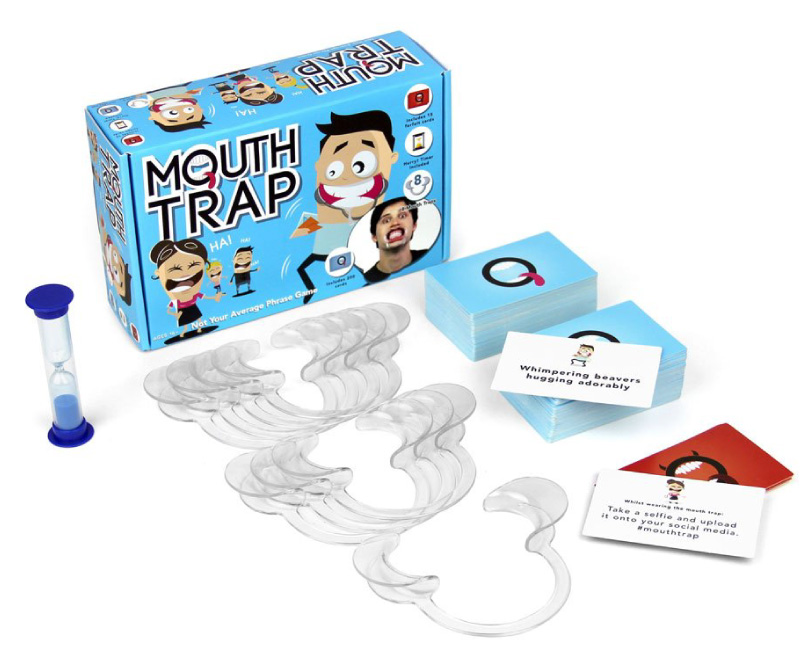
Card design development for a board game prototype
5) Developing A Game Boardgame Prototype: Refining, Balancing & Improving

With a working prototype in place and a solid proof of concept ( perhaps a ‘greybox’ version of the game ), I will try to refine the product further.

This stage includes :

  • Adjusting rules for clarity ( however, editing should be in the hands of the pros! ).
  • Balancing mechanics (fairness, difficulty, pacing).
  • Improving usability and player understanding.
  • Tweaking components and layout.
  • Graphic Design & Artwork ( if commissioned on that part ).

For those who are interested, I have written a dedicated post about my graphic design process.

Some of you may also wonder what a graphic design process even is. Well, it is not just drivel and magic dust; there is a process. Here is a general overview when working with a human!

my board game process

5 ) Solidifying the Core Product Concept – Important note:

This is not the stage for major redesigns — only improvements.

Big changes here may require making significant changes across multiple elements and components and can be costly to do. Sometimes, this is required to make a better and more compelling product, but if at all possible,I try to encourage a client to make these pivotal changes earlier in the prototype development process. Hence, a brief and discussion in the beginning.

But, saying that, making something is a journey and not always a straight road!

divider

6) Developing a Board Game Prototype Process | Playtesting & Final Adjustments

Playtesting a board game prototype process

This is where the game is truly tested. I gather feedback through:

  • Self-testing
  • External playtesting (friends, players, target audience)

I observe:

  • Is the game fun?
  • Are the rules clear?
  • Are there exploits or imbalances?

Feedback is then used to:

  • Fine-tune mechanics.
  • Simplify where needed.
  • Strengthen the overall experience.

This step may need to be repeated multiple times, depending on what is required of the prototype and client budgets!

7) Prototype Completion & Handover


The final stage. The development of a board game prototype process is now in its latter stages, and my part in the project is most likely drawing to a close. ( A solitary tear… )
Transfer and hand over of prototype


Once the prototype is tested and refined:

  • Rules are clearly written ( Find a professional proofreader! ).
  • Components are finalised ( or near-final ).
  • The game is packaged into a presentable prototype and sent to a printer!

This may include:

  • Printed cards and boards.
  • Rulebook/rules / rulesheet.
  • Other components.

At this point, the prototype is ready for:

  • Demonstration.
  • Pitching.
  • Further development or production.

Or, you may take your prototype and ask yourself whether it needs more fine-tuning. Doors and options are open.

Developing a board game prototype process example: print liaison

Optional, and not always part of my service, but I can and have acted as a mediator to arrange the printing and manufacture of a board game prototype for a client.

In short, I deal with the headache at a cost!

This is not always the case for every project. On occasion, the client may prefer to arrange the printing themselves or make amendments to the product. A real-life scenario is if the client wants to amend game rules or text in InDesign.

There are advantages and disadvantages to the client working with print themselves.

My Board Game Prototype Process | Final Take Away

Creating a board game prototype is not a straight path…

It’s an iterative journey of:

  • Testing
  • Refining
  • Eliminating weaker ideas and building an initial core game!

You start broad, then narrow down to the strongest concept.

Like sculpting – you shape, refine, and remove all until the final form emerges! Metaphorically speaking, the same applies to developing a board game or board game prototype.

AND after all that, there is still no guarantee that the developer will make their millions or their money back. Developing a product hard path, without a golden egg or promise at the end.

Golden egg at end of journey!

What is the process of making a board game prototype? Other posts

Whether you came to this post to read more about developing a board game prototype and its processes ( thank you for reading to the bottom ). Or, whether was to read about my board game prototype development process, you may find some of the following of interest.

From the graphic design process, the journey to case studies.

Box mock up
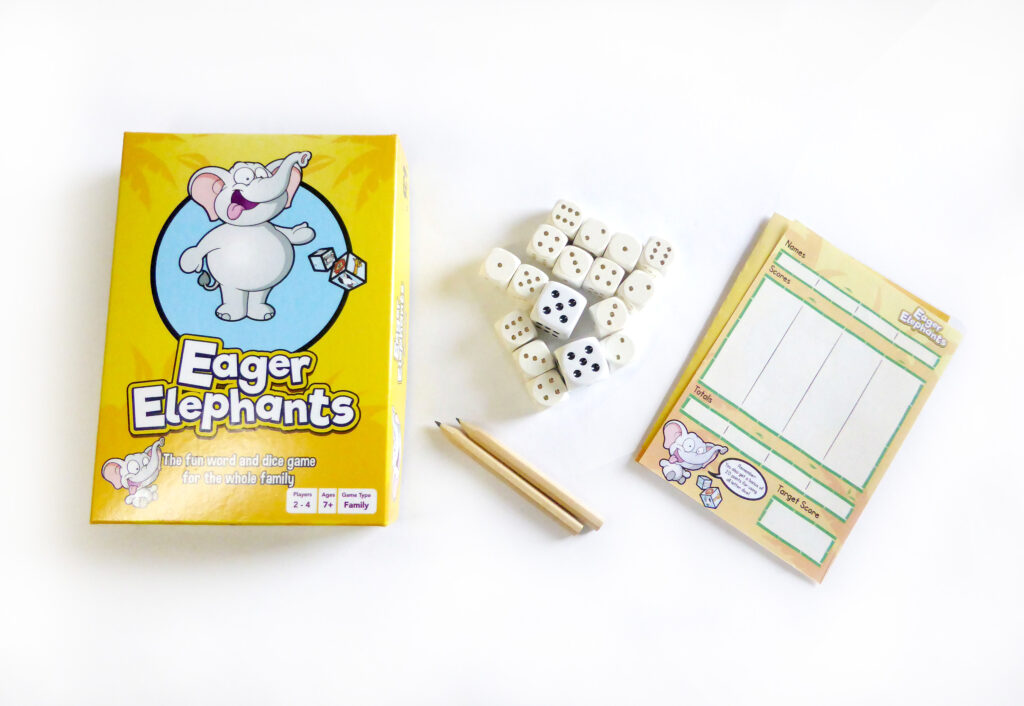
Box mock up & Packaging – Eager Elephants

My Board Game Prototype Process | Services

Thank you for reading. Here is a list of relevant services and skills I can offer in helping you to bring your vision to life. All pages are hosted on my commercial portfolio website.

Need a hand with your board game design project?

Dragon Bone Games:-


In addition to my commercial board game design services hosted on Jimmsdesign – my portfolio website, I also run a hobby game blog celebrating the passion of making board games. In addition, it celebrates other aspects of the board game hobby! I would encourage you to read and bookmark it! Thanks, awesome reader!

Dragon Bone Game Website Links :

My Board Game Prototype Process | Other interesting Sources and information

You may or may not know, but I am also an artist! I have produced artwork for games! Feel free to take a look at my art website.

JD Illustration

All content in this article is copyrighted by me and their respective owners.

Jimmsdesign 2026.

How to build a website for FREE – 3 Easy Solutions

How to build a website for free or almost free image with and arrow point in the direction
3 Simple Platforms Guide

Hobbyists, businesses, and potential clients… this post is for you!

This post covers 3 simple ways for you to build a website for free… or almost free. This article is ideal for start-ups, hobbyists, and individuals looking to gradually build their online presence. All you need is a computer and internet access.

This post will cover the pros and cons of each system based on real-life experience.

It should be noted that I am not affiliated with these companies

How to build a website for FREE – Summary Overview

To build a website for free, you can use a selection of tools, software, and hosting options to start creating your website with next to no upfront cost. Many DIY developers use platforms such as WIX and WordPress to build websites and blogs for free by learning the tools themselves. However, it should be noted that ‘Free’ is not always strictly free in the truest sense.

You can use WordPress’s free domain and hosting to save money. But the hidden cost comes at the expense of handing over proprietorship and backend administration of your website. Although it can be easier to transfer away to another hosting platform if they support a website built in WordPress.

Instead of opting for a full website, website owners and small businesses can also opt for an easy-to-maintain solution, such as having a ‘Facebook Business Page Only’ or a Blogger in the early stages of their website journey.

Feel free to read on with learning the general idea of how to build a website for free… or just hire a design guy for the job!

Here is a list of solutions to create a website for free.

How to build a website for FREE | Start building Something

1 ) You Can Use Blogger To Create a Website For Free

Not heard of Blogger? Blogger (blogspot) has been around for years and is part of Google. With Blogger, you can create your website or blog completely free!

Blogger is fine if you are looking to create a simple blog as a hobbyist or put something together quickly for a friend or relative. I have used Blogger as part of my ‘hobby and general stuff’ website, which I treated as a creative/personal dumping ground. You can see my personal blog here.

Blogger isn’t solely for amateurs. I have seen great examples of Blogger being used by professionals and semi-professionals, despite the fact that it is a free platform.

Generally speaking, Blogger is used more by hobbyists than professionals, but this doesn’t render the software totally unworthy and crap! Some blogs are great when made on this platform. Especially by hobbists.

Due to Blogger’s low point of entry, it is a magnet for homemade, freebie, and hobbyist blog creators. A great starting point for those learning the baby blocks.

Print & Pattern – is an exceptional use of Blogger. It comes with a jobs board, products, and other key information centred around graphic and surface pattern design.

Blogger Hero Perks – Blogger Review

It might also be worth mentioning that you can also monetise your ‘Blogger’ blog very easily using Adsense, should you choose to do so. But to make it worthwhile you need a hgh volume of traffic to your blog to make this worthwhile. a much more challenging method of monetisation these days.

Blogger Pros :

  • FREE – Blogger is free. You can set up an account today and start writing about your hobby or business pretty much right away.
  • Reasonably easy to use – Blogger is relatively straightforward to use. Buttons in the left-hand navigation show what is what. All you need to do is create a “new post” and type away – as easy as that, although it is not without its quirks.
  • Can be polished – with a bit of thought, a lot of application, and headache tablets, you can make your Blogger look professional. But in my personal experience, it is an uphill struggle.
  • No fuss – You can set up a Blogger website quickly; you don’t need a web guru to help.

Blogger Cons :

  • Typically regarded as unprofessional – if you are using a Blogger for a business website, it can frame you as an amateur. Blogger websites tend to have a dated essence to them in terms of appearance and format. Web users can more often than not tell something looks a bit ‘Home-made’. In business, making a good impression is important, and you want to avoid being… ‘Homemade’ if you want to be taken seriously. Not all Bloggers are created by amateurs, but many do use this platform as it is free.

    If you must use Blogger, dress it well.
  • Awkward code – know how I said to try and ‘dress it’? Now imagine trying to dress an excited squirrel! Well, it certainly won’t put its arms into the sleeves. This is Blogger, an unwilling and uncooperative squirrel. The code and interface can be very awkward to use if you are trying to tweak alignment, adjust paragraphs, or bold text. It also adds a lot of junk HTML to your article, making it needlessly difficult to tailor in code view.
  • You don’t really own it – Although it is free to use and, as a free tool, it is pretty good, it’s not all your intellectual property. Should your Blogger be closed for some reason, you will lose all of your content with it. For ‘free’, you will relinquish control and imagine losing 5 years’ worth of posts? Back up your content if you decide to use Blogger.
  • Blogger and SEO – although it’s not bad, I’m not convinced about its friendliness towards being seen by the search engines, either. Put it this way… There are many better!

How to build a website for FREE | Blogger Verdict :

It’s good for hobbyists, it’s free, but there are other options that I would consider over Blogger. Generally, if you want a professional presence, I would use a better platform, such as WordPress.

Creating Your Website For Free Verdict

Rating out of 5 :

1 = Poor | 5 = Excellent

  • Cost = 5
  • Ease of use = 2
  • Creation Efficiency = 1
  • Set Up = 4
  • Quality Of Websites ( On average ) = 2
  • Value = 2
  • Total = 16

Got more questions?

Create a website for free using WIX ( 2026 )

Although I am less familiar with the pricing structure of WIX, WIX still claims you can build a website for free.

A viable option if you are considering free options to create a website!

Wix gets some unjust stick. Developers ( hardcore coders ) scoff at it because it is a ‘website builder’; the only real reason for this ‘anti’ is due to a combination of accessibility and snobbery. Wix, which can be used by non-coders, opens up the market and enables DIYers to attempt to make a website.

My Opinion on WIX: When building a website for free

Although time has long since passed when using WIX, WIX isn’t too bad! And if you are strapped for money and just starting out, maybe consider this as a possible option in the beginning. WIX allows you to visually drag and drop your website together to create a design that you may not vomit over! You can even add snippets of code as and when required.

Not all bad, not all great in my opinion either.

Here is an example page & website I was part of when building a new website. I created both the UI and content for the page.

How to build a website for free - example website built in Wix. UI and content drawn in Adobe Illustrator

What is WIX like for building a website?

It’s pretty good in short… but there’s more to that story. I have used WIX in a past role to create an easy-to-maintain website without the need for code.

That’s well and good, but why use it?

It’s accessible, free / cheaper, great for restricted budgets, and does the job. You don’t have to be a coder either.

WIX enables users to position page elements without having to hard-code everything. You can build your website or web page visually.

Imagine using a program like Microsoft Publisher, Photoshop, or Canva to create a website from start to finish? No need to code, no headaches, no bar to entry!

There is more to website design than graphics, but for the sake of argument, I want to keep this post lean. You can make a website as a business owner or as a designer. For those who like a bit of code, you may be interested in reading a bit of theory and practice on PHP include.

WIX – you don’t need to be a Developer to make it work! The mess can be left down to the casual website developer instead. (Whoops, did I say that out loud? )

Here are my shared experiences with the WIX website builder.

Creating a Website With Wix – Pros :

  • Neat & Tidy –An all-in-one neat little packaging with a relatively straightforward drag and drop interface to assemble your website.
  • Cheap – WIX comes with a range of pricing plans to suit a variety of budgets. It also comes with its own hosting packages.
  • Cool features – It comes with some nice little integrated features, such as a mail-list manager and an easy-to-use image library; you can also create a basic shop with it, too.
  • Visual Designer – It’s great if you like to create websites visually, but please note that it’s not to be used for creating graphic design and banners!

Wix Cons :

  • The responsive design was/is sub-par – arguably worse than Blogger. As a non-developer, you may be wowed initially by how easy it is to use, but what you see isn’t what you get. They call these WYSIWYG’s. ( What you see is what you get ). Ironically, with website builders, be it Dreamweaver , Wix, or others, this is not always the case. ( based on when I last used it to make a website )
  • Build twice, takes twice as long – Further to the point, you ( used to) have to build twice or suffer a website that will not work properly on a smartphone. Eg can’t read text without zooming with fingers etc. This bad user experience will be passed on to your customers.
  • Clumsy fluid layout – As a designer, this would be something I would pick up on. The default desktop website can have some somewhat awkward behaviour when it comes to viewing the website in different browsers. Fluid and responsive websites are not easy to build, and WIX certainly hasn’t mastered this yet.
  • Slow Down – If you have a large webpage with lots of elements and content, this can overwhelm the WIX builder. You will find that as you are dragging (pushing) elements around, they start to lag and stick. This can become very frustrating if you are trying to work toward a tight deadline in a busy or demanding environment.
  • limited control with deeper development issues – By using a website builder such as WIX you surrender building a more accessible and technically proficient website. It’s also trickier to get into the real nuts and bolts to solve somewhat basic issues.

Wix Verdict – Jack of all

Cheap and cheerful and great for non-techies. This user-friendly website builder is good if you’re starting out. I have seen WIX used for straight up brochure and small-scale websites with great results and if you are on shoe string, it could be something to consider. WIX is nice to use, quite slick and an intuitive piece of online software! Not the cheapest, but ok.

Rating out of 5 : : 1 = Poor 5 = Excellent

Cost = 3
Ease of use = 5
Creation Efficiency = 3
Set Up = 4
Quality Of Websites = 2
Value = 3

Total = 20

———————————————

Best Price – WordPress is Free

WordPress has been available for years! It has grown a very large and loyal following that is building better product everyday. WordPress is completely free to use, it’s open source and has a large community of developers and agencies available to help. If you have your own domain and hosting, using WP is as simple as downloading and implementing it yourself. Certain hosting companies come with One-Click installer, which can make installing very straightforward, but this isn’t the case for all hosting companies.

Wordpress logo

If you don’t have hosting or a domain, you can also set up your WP hosting completely free – WordPress > don’t panic!

You can create very powerful website using WP and comes with a very large library of resources to build different types of websites: stores, blogs, brochure sites, downloads sites, ticket software, etc., etc. – it’s vast and WordPress has gone way beyond being just a blogging tool!

WordPress is integrated with many 3rd party companies, which range from over-automated email systems to analytics. There is also themes which turn WP into a visual website builder. All this plus the features mentioned before.

WordPress Cons

Hackers like it – being a victim of its own success and a large proportion of websites being made using WordPress, it’s a hackers paradise. If you have a very large-scale website, perhaps other options are better to consider.

Plugins can break – Although there are 1000’s of plugins on the WP marketplace, some of them can fail over time if they are not maintained.

Needs to be maintained – WordPress needs TLC occasionally. Pay attention to your dashboard or email notifications if you need to update your current version of WP or its plugins.

Set up – WordPress can be a challenge from time to time when trying to install it on your own host. This can range from obscure incompatibilities or ‘access’ not being configured properly

Tricky to change – The default version of WP can be tricky to tailor without knowing your way around CSS or downloading a plugin. This is where using a developer could come in use if you decide to use WordPress.

Used a lot – due to a lot of websites using WordPress website can start to feel the same.

WordPress Pros

Progressive & Powerful – WordPress is always pushing forward with its technology and its developer community are always improving the platform.

Community – WordPress comes with a large pool of knowledgeable developers creating new functions and extending the functionality of the default software through plugins and themes, which can either be purchased or downloaded for free.

Powerful for no or low budget (FREE) – you can create a professional and functional website with default WordPress software.

Do what you like with it, more or less – create your website today on your own domain and hosting, and you and can do what you choose with it – isn’t that great!

Simple to use – It comes with a reasonably easy-to-use ‘dashboard’ – not too dissimilar to Blogger.

– Plugins and Themes – Just too much awesome to list. Also, a lot of dross, but there is essentially a candy store of added functions to select from.

Rating out of 5 : : 1 = Poor 5 = Excellent

Cost = 5 / (*1 )
Ease of use = 4
Creation Efficiency = 4
Set Up = 3
Quality Of Websites = 5
Value = 5

Total = 26 / (*22)

*Cost variable due to free VS paid. As this article is about free and low-budget website solutions, the score jumps from free to expensive depending on whether you need a dev to help you.

WordPress Verdict : Great Value, Great quality

WordPress is a good platform and is worth considering if you want flexibility in what functions come with your website and whether you want to change it at a later date. You may require a developer to help you in the beginning but after that, your WP site is yours to do with as you choose.

That’s all! 3 Simple ways for getting a website online – in detail.

I hope this will offer some insight! If you need a Graphic Website Designer to help out with creating your business send me a message or if you have any queries about the listing above – also get in touch and will try my best to answer!

This article was written to give some guidance as how to go about creating a free website. This is based on my skills and experience. The opinions, based on my experience, are ‘my opinions’ and not that of others. Please bare in mind when making your business decisions on you website that you have considered what has been written and do your research thoroughly.

The scores were created for a bit of fun.

The platforms listed are tools. It’s down to you to offer great experience and value to the person reading it.

Why note read :
Why use Unity for your gaming project –
32 Tips for email marketing
Website UI Design
How to Design a Kickstarter Page

How We Made A Successful Retail Ready Card Game

How to make a retail-ready card game!

If you’re looking at how to create a retail-ready card game that you can sell to large retailers, this article covers the stages and strategies we used ( in my former role) to design and create a successful game.


This article is both a ‘how-to’ and a case study for those who are interested.

How we made a successful retail-ready card game … in steps

Steps Used To Create a Successful Game

Simplified stages for creating the game.

The stages used to make a retail-ready card game could be assumed to be universal. However, I feel that could be do broad and ‘assuming…’

This here is the process used to make THIS retail-ready card game. One that garnered excitement and earned my former employer a decent sum of money.

  • 1 ) Research ideas.
  • 2 ) Research trends, add a unique spin.
  • 3 ) Use inspiration, don’t make cheap or low-quality copy.
  • 4 ) Get your game out there for businesses to see.
  • 5 ) Create something worthwhile.
  • 6 ) Keep the production cost down.
  • 7 ) Test and polish the game.
  • 8 ) My part(s) in creating the card game
How to make a retail-ready card game!
First edition of the game

Also, to those who are interested, here is some information on my new game consultation service.

“We didn’t want to leave it to chance“

How to make a retail-ready card game – Why this game was made

It was not an accident that Mouth Trap was created and sold to 1000’s of copies in shops across the globe.

After undertaking initial research into new product ideas, a colleague mentioned to me that he had seen a game where players had to say silly, tongue-twisting phrases whilst wearing a dental mouth restraint.

I was unconvinced…

He proceeded to open a tab in his browser and play a clip of the television program. Without paying too much attention to the idea, I dismissed it at first. Thinking it was a game, only people like me and him would play. But he persisted with the idea.

I was half right, but little did I or the company realise how popular it would be.

After seeing James Corden trying to speak with one of these dental mouth restraints in his mouth, we came to the conclusion it could be funny if it were boxed and ‘gamified’ for a consumer market in the UK.

We created something that followed a trend but was different enough to stand out from what would become a busier crowd.

We went forward to create a successful card game! And what a blast we had creating it!

My part in the project involved the visual design, collaborating to create the cards and their contents, the box cover, and playtesting the game. Here is another example playtest for another project.

Big Tip 1 ) How to make a retail-ready card game | Research, Research, Research

You need to do homework. Without it, you are making something blind. Ever distancing your chances of hitting your retail success, whether you base this on popularity or consumer sales.


When creating a game you intend to sell in ‘big-retail’ make sure to undertake as much research as possible at the beginning.

For example, we wanted to know if there was an audience ready for the game, we didn’t want to to go the trouble of making the game – spending £ 1000s in company budget and time only to discover nobody wanted it, or that we had no way of selling it.

We didn’t want to leave it to chance.

Don’t just research aimlessly. Your research must carry an aim and purpose.

Considerations for research when trying to make a card game for retail

I have come to learn that there are different demographics in the board game community. These 2 demographics can also be extreme opposites in tastes within tabletop gaming.

When considering how to make a retail-ready card game, ensure you have a target demographic in mind, now design your game specifically for that group. It can be hard to please everybody.

  • Who will play it?
  • How much will they spend?
  • Why would they play it?
  • Do you need to educate the customer on how the product works?
  • Take note of the types of players for the game

These are just some of the questions to ask when creating a retail-ready card game for the masses! Learn to appreciate your group!

Creating a ‘trend’ game with a difference

The game we created wasn’t revolutionary, but it took some lessons from other successes. Something you can take away – you don’t need to reinvent the wheel.

Creating a game is a BIG decision. The volume of eager, fresh-eyed enquires I receive, thinking ‘it’s all fun and games’, is high. It is not long before I see bleary eyes and jaded tones trudging the midstages of a very big project, even when I try to keep clients motivated.

How you frame your project matters both emotionally and financially.

Board game development is a very costly commitment. You will want to see the fruits of your labour, even if you do have fun along the way!

A difference: When working with the team, we studied competitor websites, products, and online reviews. We collected our data and based our design and content decisions around the information we had collected.

This often fell in line with a process the company called NPD – (New Product Development)

Observe the greats, watch the audience, and plan your actions.

How to make a retail-ready card game - NSFW Mouth Guard game Render
Concept and draft for adult edition – this edition was filled with crude phrases

We wanted to know who would buy this product and how we could be different.

We added our own style, created rude cards, included some playful forfeits, and developed add-on packs. It even went so far as to create an early proof-of-concept app, but that was shelved, sadly!

Know This: Retailers won’t take stupid risks | Surfing a trend proved to be a wise move!

Retailers won’t care about your product as much as you do.
They don’t want headaches. They don’t want problems. How can they gain? Retailers want to know what supplying your product will do for them.

That is a blunt way of putting it, but largely true.

Proving that your product follows a trend can put you in good standing, but be prepared to fight in a market that will saturate quickly.

Trend chasing can be very advantageous in the short term, but challenging to sustain and fight in the long term.

Tip 2 ) Making A Game A Retail Ready Success | Learning from the greats ( stand on the shoulders of giants )

Stand on the shoulders of giants! See what they see. See what they do and consider what you can do from this great vantage point. The greats can offer a brilliant blueprint. But a downside to this is that it can hamper originality.

Assuming you have gone with an existing product that has an established community and marketing buzz, creating an out-and-out copy won’t get you very far or last for the long-term.

Setting aside legal issues, market saturation and being a grubby business practice, you will want to create something good and call it your own. Even if you take some inspiration elsewhere.

We brainstormed various ideas on how we could have different modes of gameplay. Alterations to rules, extra dynamics of the game, and remember to keep it low-cost.

Tip 3 ) Get access to gaming retail channels

If you want to create a game that is successful in the retail market, you will need to have access to companies that can sell your game on your behalf.

Or you may prefer to sell your product directly to the customer, but this is much harder to scale as a business. Some companies also adopt a hybrid approach of a wholesale business model and selling directly to customers.

As a case study on how to make a retail-ready card game, or at least a successful one as illustrated throughout this post, I will focus on how this card game was sold.

You may already have access to shops and stores that can sell your game, or you may aspire to sell the game yourself. But if you want to scale quickly, you will need to ‘wholesale’ your game.

This game was sold via Hasbro, Robert Dyas, to name a couple of large high-street shops in the UK.

Finding retail channels for new business can be tricky.

Consider going to Expos and events. Look at Kickstarter campaigns to raise funds and awareness of your game.

For those who are interested. I run a website dedicated to making tabletop gaming and the niche of making games.

You may find the post about: List of UK game expos useful. Or board game fulfillment companies.

OR if you need help with your game design, take a look here :

Need a hand with your board game design project?

Tip 4 ) How to Make a Retail-Ready Card Game | Customer Validation

In order to make a good game, your product needs to be good. It is short-sighted to make a pretty but unplayable game. A crap game will prove it is crap once it is available to the market. The general public can also be ruthless with their opinions. Make sure to run playtests on your game first. As illustrated in this article.

Our card game had become popular.

We needed to create more content and quickly! Surfing the wave of this success, we created more content and more products. We created additional expansion packs, card decks, and different editions of the game to serve a hungry market for the game. The project was intense, but it was both a blast to make and the party game market liked it too.

Observing what the audience said

The game started to gain popularity and traction online from social media, to Amazon, to other forums, comments, and outlets. We looked at the reviews to see what we were doing well and what we weren’t. Some comments can be stinging to read! Others were throwaway opinions.

Design by data.

End-users (customers on the street) were enjoying the game and sharing their joy and comments. This gave us a great sense of pride, we had created something that the world enjoyed.

Our product was making people happy! ( felt good about that!)

Mouth Trap Product review image
Happy customers!

“Hilarious !! We had a great laugh looking at this when it arrived and can’t wait for Boxing Day with friends to have a game. One thing though, I had a cold when I first tried it and my lips were dry so they got sore, it may be worth putting a bit of Vaseline on before putting the trap in your mouth if you have dry lips”

“Xmas pressie so not yet looked at”

Create something people will enjoy. You want them to take away a good user-experience and feel happy with their purchase. No one wants to pay money for a game that is clearly a rip off and landfill.

Tip 5 ) Keep it affordable

When I say keep it affordable, I mean keep it ‘accessible‘.

When we created this game, we wanted to create something that was good value for money. Adding more to production costs has a knock-on effect. When it comes to selling your game, and whether the end user can afford to buy your game, consider the final cost. This can have an enormous effect on the success of your game. The price point!

Keep it affordable, does it need spot UV printing? No.

Will your cost reduction impact the gameplay? If no, then consider removing it.
The more you add to your game, the higher price you will have either pass on to the customer.

By all means, keep the cost low, without compromising on the quality of the game.

This game was between £15 – £20 for the minified edition of the game. Lower prices can also keep it affordable to a wider audience. IF you want to keep a premium version of your game, consider a travel version or a minified version also.

Use a ‘Minimum Viable Product’ – remembering not to insult the customer with your finished game by going too… ‘Minimum Viable Product’

Tip 6 ) We Play-Tested This Game! Again, and again…

Want to help ensure the longevity of your game for longer-term success? Please play test it.

Once the initial prototype of this card game was created. We tested the product and its phrases to see what worked and what needed improvement. You would be surprised by what you can discover in a play-test.

Don’t do this – A hot t*rd wrapped in a shiny ribbon

I have played a couple of board games over the years, which looked fancy but were either unplayable, unenjoyable, or and with poorly written or ill-considered rules. Even as an indie board game creator, you should aspire to make something that can at least be played and enjoyed.

The aesthetics of a board game are like putting the “cart before the horse” when it comes to making a card game or board game. You shouldn’t create a game that looks good but is terrible to play – people will feel duped!

You are not selling art first. You are selling a board game. However, the art can be very important; it shouldn’t be a compensation for gameplay or game mechanics.

If we were to make this game again. I would still try to make it enjoyable again. Although, do consider that what is fun for one person can be misery for another.

Example playtest for this successful card game

Mouthtrap was initially tested on some peers and colleagues. This is better than no testing at all, but leaves plenty of room for improvement.

Play tests allow you to develop core game mechanics in a safe environment. Don’t leave it to the general public to discover broken game rules and mechanics.

Testing the game ‘only on you’ is the first port of call. But you will play your game as you expect to play it. People often play games in unexpected ways and interpret rules in a certain manner. You can read more on this article of working with Beta testers when playing a game.

Game Consultation: Share your thoughts!

Need a hand with designing your game?

Tip 7 ) The appearance of the game is important to its success

When asking how to create a retail-ready card game, the end product matters if you want to strive towards success. The appearance matters if you want to be taken seriously. Want your product to resonate with target board game players and it matters in the marketing of your game. In certain scenarios, the appearance of your game matters more or less depending on the nature of your game.

Retailers like a ‘professional-looking game‘. They want a game that they feel they can sell to their customers. They want an appealing product to place on the shelf and help sell a product. The retailer may also seek to find a product that is a brand or culture fit with their existing ranges.

Likewise. Players want to look at the game. It needs to look better than something they could do themselves. Nothing too homebrew.

Design can be a great thing for a product. Not just in appearance, but also in marketing and telling a part of a collective narrative in the game. Graphic design; I will say controversially, can also be used as a dark art.

Disguising a poorly constructed card or board game in ‘great graphic design’

If you want longer-term success with your game. Don’t do this. I have played games that looked great but are unplayable. Don’t rely on graphic design as a gimmick to sell a weak product.

A good example of a popular game is Chess. It has come in many guises over time, ranging from drinking editions to Harry Potter, but it still has the solid foundations of being a good game (open to opinion), which can be played over and over again. It needs no introduction.

Chess is a classic game. It can stand on its own two feet without being wrapped in a gimmick, as the foundations are already there. You can play it!

IF you were to design a piece of packaging for a chess game. It would only help to sell an already great game. It doesn’t need design to be used to disguise its shortcomings. Graphic design should be used to help sell an already strong product, not carry it.

Fortunately for this game, we felt that it was fun for most before moving to the graphic design stages.

How to make a retail-ready card game | The Design Process –

This step covers some of the journey involved in creating the product. Creating cards, the logo, the box, the concept, the marketing material for the game… writing!

How to make a retail-ready card game - Initail Graphics and vibe for packaging and cards
Title, logo and vector

Box net design for drinking edition game

Box for drinking editions

Mini version of game

The first box (edition 1) was created using a pizza box type Dieline. The later editions came as a top and bottom box with a lid.

How to make a retail-ready card game the minified games - Mouth Trap
Card design board games

(Card Art

This was one of my favourite aspects of the game. Creating the cards. Later editions of the cards were changed so that phrases were on both sides. Visually, a little less appealing but offered better value to the customer and extended the length of game play.

Piddle Pants Monk – Game Illustration

Vector of a monk that has wet himself!
Heavily changed stock graphic. only the face shape, and mouth are the original
Vectors of drinking bottles
Some of the vectors created by me and placed onto the artwork

All design work on this post is copyright owned. Please do not take or use without prior permission.

Why not start building your successful retail-ready card game!

Need a hand with your board game design project?

You can read more about this project in this post – Designing a board game prototype

How to make a retail-ready card game – Other helpful links

Other websites you may find interesting for making games

Okay, you got me. I am the owner of Dragon Bone Games.co.uk. A website all about making games, a niche gaming that you may find interesting to know a bit more about. Here are some links.

*All links lead to the 3rd party website.